
PACKAGE INSPECTOR
PACKAGE INSPECTOR
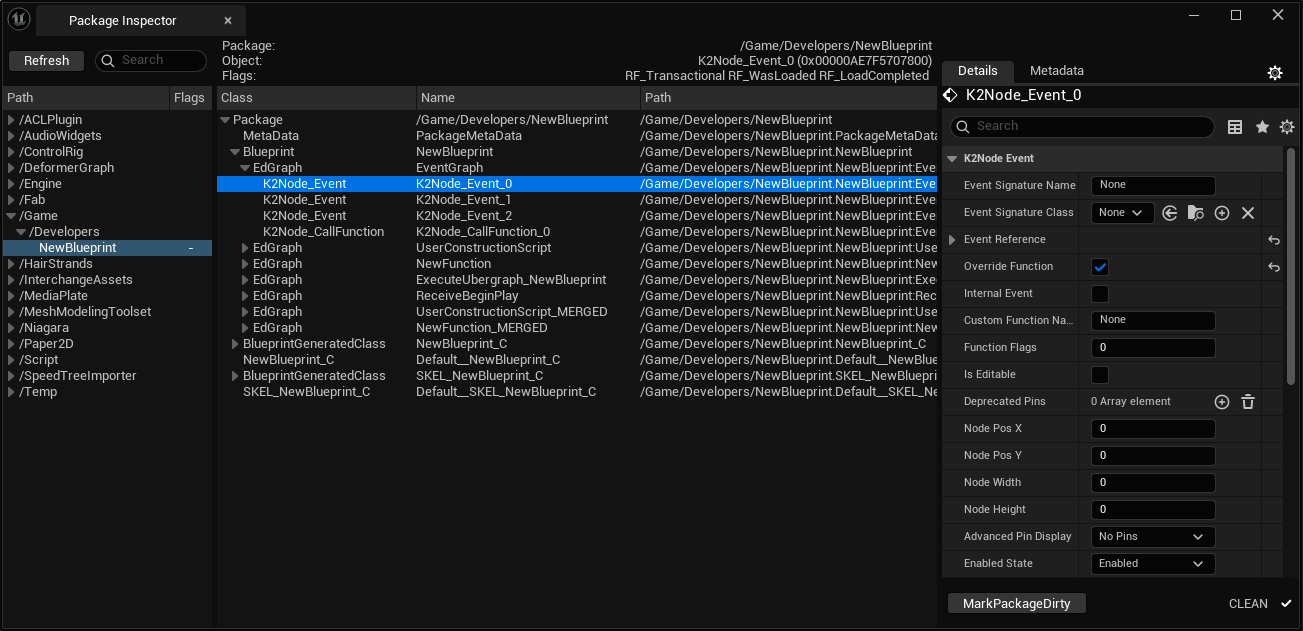
Package Inspector is built by developer for developers.
Sometimes you need a bit more freedom to understand:
- what is happening and why
- where this data is stored
- the hierarchy of a custom asset
In addition, there may be a need to modify certain properties via the reflection
system without opening the asset, or to create and add extra objects to a loaded
memory package, even if it is transient.
All of this - and more - becomes easier with this tool.
1. Package block – generates a tree of already loaded packages.
2. Object block – helps you analyze the hierarchy of objects inside the selected package (outer inheritance).
3. Detail block – allows you to modify properties of the selected object stored in the reflection system.
4. MetaData block – lets you check, remove, modify, or add metadata of the selected object in its outermost package.
5. Context menu – helps you copy the path or memory address of an object, create new subobjects, rename, or even destroy objects!

! Be sure to use a version control system in your project when using Package Inspector !
Commit your changes before experimenting with package modifications so you can easily roll back if needed.
Package Inspector - is advanced tool for advanced developers. User mistakes when using certain
features of this tool can cause engine crashes, and modifying assets may lead to data loss.
Read the documentation on dev.epicgames.com to make sure you know what you're doing.